Notecase version 1.6.9 released
I've just released new version of Notecase.
I've had a good feedback from users and testers in the past period,
so this version features some important bug fixes.
Big thanks goes to Marcus Hennig for his help on testing Notecase, giving numerous quality suggestions and maintaining German translation. Marcus is also a new team member, he plans to help testing the application on the regular basis.
Additionally, I must thank the program translators. In this version several translations were updated.
So enjoy the new release (feedback is always welcome).
As said before, Pro version should be released in 4-5 days.
Saturday, September 29, 2007

Tuesday, September 25, 2007
Notecase to be released soon
I plan to release new Notecase version in a next few days (Pro version will follow a week after). That's why I've updated and uploaded new translation template files (notecase.pot and notecase_pro.pot).
If you want to have complete translation for your favorite language in the next release, now is your chance.
I plan to use blog posts to notify of new releases in the future too, so you'll be able to track the need to update translation through the RSS.
I plan to release new Notecase version in a next few days (Pro version will follow a week after). That's why I've updated and uploaded new translation template files (notecase.pot and notecase_pro.pot).
If you want to have complete translation for your favorite language in the next release, now is your chance.
I plan to use blog posts to notify of new releases in the future too, so you'll be able to track the need to update translation through the RSS.
Wednesday, September 19, 2007
News
It's been a while since the last post. After releasing new version of both Notecase and Notecase Pro, there were some issues with the code that required quick fixes and new release posted.
Now that the "crisis" is over, I've turned to the brave new features.
I've noticed that Notecase Pro version loads the new database format (.ncdb) slower than it should. After some profiling and a lot of tweaks in various places, the new results are spectacular! New fixes benefit the other document formats as well!
My test .ncdb document with 6411 nodes now loads in 2 seconds instead of 9 (as was before).
Load time for the same document in .ncd format fell from 27 to 4 seconds.
If that does not sound spectacular listen to this: load time for the another .ncd document having 31000 nodes fell down from 338 to just 10 seconds !
Off course, having changed so much code will require detailed testing.
It's been a while since the last post. After releasing new version of both Notecase and Notecase Pro, there were some issues with the code that required quick fixes and new release posted.
Now that the "crisis" is over, I've turned to the brave new features.
I've noticed that Notecase Pro version loads the new database format (.ncdb) slower than it should. After some profiling and a lot of tweaks in various places, the new results are spectacular! New fixes benefit the other document formats as well!
My test .ncdb document with 6411 nodes now loads in 2 seconds instead of 9 (as was before).
Load time for the same document in .ncd format fell from 27 to 4 seconds.
If that does not sound spectacular listen to this: load time for the another .ncd document having 31000 nodes fell down from 338 to just 10 seconds !
Off course, having changed so much code will require detailed testing.
Sunday, August 19, 2007
New Notecase Pro release is approaching
I am working hard to iron the last problems with the new Pro release.
The release should be impressive, with major features:
The only Maemo-related problem is that when using "maemo-custom" file open/save file choosers, application keeps crashing.
If someone can help me with the problem, you can find both latest code for Notecase and the .deb file at http://notecase.sourceforge.net/temp/
I am working hard to iron the last problems with the new Pro release.
The release should be impressive, with major features:
- two new file database-based document formats (encrypted and unencrypted). This will allow for creating and using really huge documents.
- text font formatting support
- text background color formatting
- option to automatically generate links while typing URLs ("http://", "https://", "ftp://")
- added "Read-Only" document property
- MAEMO platform support (Nokia N800)
The only Maemo-related problem is that when using "maemo-custom" file open/save file choosers, application keeps crashing.
If someone can help me with the problem, you can find both latest code for Notecase and the .deb file at http://notecase.sourceforge.net/temp/
Thursday, August 02, 2007
Wind of change
I hope you like the latest speed of changes, here is another one :)
Few days ago I've read a great tutorial on how to develop for Nokia Maemo (Nokia N800) platform using a SDK on your Linux distro. You can find the tutorial here.
The result is a Notecase port to Maemo platform (see the screenshot below) !

The only strange thing that I've noticed is that the toolbar is placed at the bottom of the screen. I've yet to see if this is my error, or something else.
This is a completely new platform for me, so I am very interested if someone could give it a try, test the program, and give me an opinion.
Binary .deb and sources are available at the standard (pre-release code) storage: http://www.sourceforge.net/temp/
I hope you like the latest speed of changes, here is another one :)
Few days ago I've read a great tutorial on how to develop for Nokia Maemo (Nokia N800) platform using a SDK on your Linux distro. You can find the tutorial here.
The result is a Notecase port to Maemo platform (see the screenshot below) !

The only strange thing that I've noticed is that the toolbar is placed at the bottom of the screen. I've yet to see if this is my error, or something else.
This is a completely new platform for me, so I am very interested if someone could give it a try, test the program, and give me an opinion.
Binary .deb and sources are available at the standard (pre-release code) storage: http://www.sourceforge.net/temp/
Wednesday, August 01, 2007
Project feedback
We users are interesting creatures.
Sometimes, we do not like how some part of the program works. Or we have some cool ideas that would make it 100 times better!
But usually we keep the ideas for ourselves. Or we speak to the wrong people.
Being curious about what users think on Notecase, I run a thorough Google search from time to time.
And this thing always amazes me: you can find a lot of ideas and bug reports in some blogs, forums, newsgroups that were never pushed upstream to the project's author.
Even worse: you can a number of distros that patch the Notecase code but they never try to work with me to push those changes upstream.
It appears that this is a more rule that exception in a open source world. Maybe the users are afraid to have the idea rejected. That's one possibility, but this is also a chance to make the program that you use better and more suited to your needs.
I always kept an open ear to the user suggestions. I don't plan to stop now :)
We users are interesting creatures.
Sometimes, we do not like how some part of the program works. Or we have some cool ideas that would make it 100 times better!
But usually we keep the ideas for ourselves. Or we speak to the wrong people.
Being curious about what users think on Notecase, I run a thorough Google search from time to time.
And this thing always amazes me: you can find a lot of ideas and bug reports in some blogs, forums, newsgroups that were never pushed upstream to the project's author.
Even worse: you can a number of distros that patch the Notecase code but they never try to work with me to push those changes upstream.
It appears that this is a more rule that exception in a open source world. Maybe the users are afraid to have the idea rejected. That's one possibility, but this is also a chance to make the program that you use better and more suited to your needs.
I always kept an open ear to the user suggestions. I don't plan to stop now :)
Did you know that you can be notified when new Notecase is released?
Every project that is being hosted on sourceforge.net has a mechanism to notify users when new files are relased.
To do this, you need to do following:
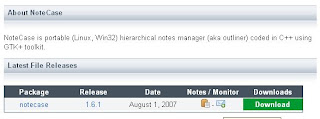
This way you'll get an email each time Notecase is released.
If you wish to unsubscribe this notification, just click the same monitor icon once more.
Every project that is being hosted on sourceforge.net has a mechanism to notify users when new files are relased.
To do this, you need to do following:
- register as new user at sourceforge.net (it's free)
- make sure to fill in your real email in the user settings
- after logging in your SF account find out project summary page at: http://sourceforge.net/projects/notecase
- click on the green section link titled "Download NoteCase" (see picture below)

- on the next page, click the "Monitor" icon (icon of an envelope) to subscribe yourself for a notification (see image below)


This way you'll get an email each time Notecase is released.
If you wish to unsubscribe this notification, just click the same monitor icon once more.
Release day
I've just made a double release!
Notecase v1.6.1 and Notecase Pro v1.6.4 are out.
New things in Notecase:
- Macintosh OS X port
- support to execute links for Linux systems that don't have GnomeVFS (thanks to Barry Kauler from Puppy Linux for a suggestion)
- "Change password" feature for encrypted documents
- added support to execute your own external script to process exported file (post processing)
- import from text file
- import: if unknown format, ask user whether to import as text file
- optional "close to tray" feature (when clicked "x" on window title, minimize to tray instead of closing)
Notecase Pro ships with previously listed features and these major new feature:
- spellchecker support (based on aspell)
- bulleted list support
- hyperlinks now can point to the node inside another Notecase document
- there is a new view - flat list view - that can be filled by a search action
- option to edit picture in external image editor
This Notecase Pro release has been one of the release with a biggest number of code changes. I hope you'll like the speed of the changes :)
I am very eager to hear your ideas and thoughts on the future of this program.
I've just made a double release!
Notecase v1.6.1 and Notecase Pro v1.6.4 are out.
New things in Notecase:
- Macintosh OS X port
- support to execute links for Linux systems that don't have GnomeVFS (thanks to Barry Kauler from Puppy Linux for a suggestion)
- "Change password" feature for encrypted documents
- added support to execute your own external script to process exported file (post processing)
- import from text file
- import: if unknown format, ask user whether to import as text file
- optional "close to tray" feature (when clicked "x" on window title, minimize to tray instead of closing)
Notecase Pro ships with previously listed features and these major new feature:
- spellchecker support (based on aspell)
- bulleted list support
- hyperlinks now can point to the node inside another Notecase document
- there is a new view - flat list view - that can be filled by a search action
- option to edit picture in external image editor
This Notecase Pro release has been one of the release with a biggest number of code changes. I hope you'll like the speed of the changes :)
I am very eager to hear your ideas and thoughts on the future of this program.
Monday, July 23, 2007


Monday, July 02, 2007
Coming ... Mac OSX port
Good news for users that wanted to have Notecase working on Macintosh.
I got my hands on a iMac (G4 800MHz, 256MB sdram, OSX 10.3.7), and the result is that both Notecase and Notecase Pro will be able to run on OSX, starting from the next release.

As you might guess by the picture, GTK on OSX still does not use native API, so each app must be started within the X11 server.
I've also ported Atol on OSX, having just few problems with Zip archiver plugin. Once that is fixed Atol will have its long-due release.
Good news for users that wanted to have Notecase working on Macintosh.
I got my hands on a iMac (G4 800MHz, 256MB sdram, OSX 10.3.7), and the result is that both Notecase and Notecase Pro will be able to run on OSX, starting from the next release.

As you might guess by the picture, GTK on OSX still does not use native API, so each app must be started within the X11 server.
I've also ported Atol on OSX, having just few problems with Zip archiver plugin. Once that is fixed Atol will have its long-due release.
Tuesday, June 26, 2007
Notecase Pro launched
After a few months work on the Pro version, I've finally created the website and published the builds for this new project of mine.
 You are invited to visit the new website at: http://www.virtual-sky.com and give it a try.
I am interested in the feedback and ideas regarding both the program and the new website.
Other than the features mentioned in the last post, new program also supports an import from Tuxcards format (currently text only).
Note that, when the program is being in unregistered mode (when there is no license key file found in the system), "Save" and "Export" features are being disabled.
BTW, product ordering should become active any day now.
After a few months work on the Pro version, I've finally created the website and published the builds for this new project of mine.
 You are invited to visit the new website at: http://www.virtual-sky.com and give it a try.
I am interested in the feedback and ideas regarding both the program and the new website.
Other than the features mentioned in the last post, new program also supports an import from Tuxcards format (currently text only).
Note that, when the program is being in unregistered mode (when there is no license key file found in the system), "Save" and "Export" features are being disabled.
BTW, product ordering should become active any day now.
Friday, June 08, 2007
New Notecase Plans
I've been on a vacation in Ireland recently, and now that I am back, I am working on my new plans for Notecase.

You might have noticed, it became hard to invest my free time into a free project (I've been doing it for 3 years now). Lately I had a simple choice: either to drop this project and start working on a paying side-jobs, or to start commercial venture based on the Notecase project.
Since I can not let go off this project easily, I have a following plan:
The plan is to create a commercial version of Notecase named "Notecase Pro", that will incorporate many advanced features and feature that are not trivial to add.
The possible commercial success of this project will enable me to continue working on a free, open source version of the same project. For the free version, I plan to concentrate to make it bug free and make it faster.
So, you can expect new Notecase Pro release soon. It will feature:
- multiple document interface
- support to import Knowit documents
- support to import Keynote documents
- support to import Treepad documents
Document importing might ignore text formatting in the first version, but I plan to support the full thing soon.
If you wish some new feature, I am open to your ideas and suggestions.
I've been on a vacation in Ireland recently, and now that I am back, I am working on my new plans for Notecase.

You might have noticed, it became hard to invest my free time into a free project (I've been doing it for 3 years now). Lately I had a simple choice: either to drop this project and start working on a paying side-jobs, or to start commercial venture based on the Notecase project.
Since I can not let go off this project easily, I have a following plan:
The plan is to create a commercial version of Notecase named "Notecase Pro", that will incorporate many advanced features and feature that are not trivial to add.
The possible commercial success of this project will enable me to continue working on a free, open source version of the same project. For the free version, I plan to concentrate to make it bug free and make it faster.
So, you can expect new Notecase Pro release soon. It will feature:
- multiple document interface
- support to import Knowit documents
- support to import Keynote documents
- support to import Treepad documents
Document importing might ignore text formatting in the first version, but I plan to support the full thing soon.
If you wish some new feature, I am open to your ideas and suggestions.
Wednesday, March 07, 2007
Great news. I've got myself a Zaurus.
I've actually got it through a deal with Daniel, as a payment for my work on supporting MM/LX format import in Notecase. It came with Daniel's weeXpc platform preinstalled.
I had a strange feeling when trying a Zaurus for the first time. It's something looking so toy-like and it's also a serious tool, all at the same time! After playing with it for half a day, I now feel very comfortable working with the little machine. Especially, when Daniel told me that there is a stylus that I can use instead of my fingers :)
I hope that Notecase users on Zaurus will benefit from the fact I can test my program(s) on it. I've already fixed Zaurus-specific bug with application crashing when you press "Add" or "Remove" button to add/remove node tags in the "node properties" dialog.
It turned out the bug was due to GTK call "gtk_combo_box_get_active_text". It appears this call causes the application to crash (probably a bug in GTK port used by pdaXrom platform).
To make the code work I had to replace the call:
gtk_combo_box_get_active_text (GTK_COMBO_BOX(cbo3));
with
gtk_entry_get_text(GTK_ENTRY(GTK_BIN(cbo3)->child));
I've added more changes, based on Daniel's suggestions, that will benefit Zaurus users. One of them is a better title in the main window. New format is something like "basename.ncd - Notecase 1.4.9 [/full/path/here/basename.ncd]"
This way, when the window is minimized to "task bar", you still can see document name without the need to maximize the window.
So, expect a new shiny release soon ...
I've actually got it through a deal with Daniel, as a payment for my work on supporting MM/LX format import in Notecase. It came with Daniel's weeXpc platform preinstalled.
I had a strange feeling when trying a Zaurus for the first time. It's something looking so toy-like and it's also a serious tool, all at the same time! After playing with it for half a day, I now feel very comfortable working with the little machine. Especially, when Daniel told me that there is a stylus that I can use instead of my fingers :)
I hope that Notecase users on Zaurus will benefit from the fact I can test my program(s) on it. I've already fixed Zaurus-specific bug with application crashing when you press "Add" or "Remove" button to add/remove node tags in the "node properties" dialog.
It turned out the bug was due to GTK call "gtk_combo_box_get_active_text". It appears this call causes the application to crash (probably a bug in GTK port used by pdaXrom platform).
To make the code work I had to replace the call:
gtk_combo_box_get_active_text (GTK_COMBO_BOX(cbo3));
with
gtk_entry_get_text(GTK_ENTRY(GTK_BIN(cbo3)->child));
I've added more changes, based on Daniel's suggestions, that will benefit Zaurus users. One of them is a better title in the main window. New format is something like "basename.ncd - Notecase 1.4.9 [/full/path/here/basename.ncd]"
This way, when the window is minimized to "task bar", you still can see document name without the need to maximize the window.
So, expect a new shiny release soon ...
Thursday, December 28, 2006
Notecase factory
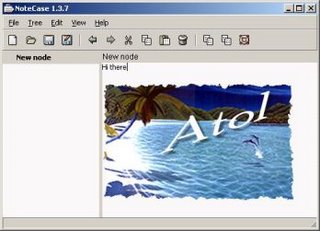
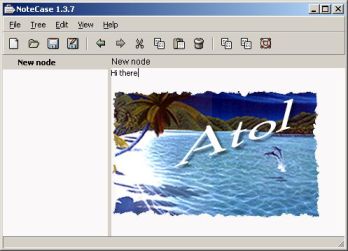
This is just a quick tease for all Notecase users. The next version will have (actually already has) support to insert images in your document. You can see how it looks at the picture below.
For the brave ones, the code to test this feature is available at http://notecase.sourceforge.net/temp/
Hint: to use this, just click the second-last toolbar button ...
This is just a quick tease for all Notecase users. The next version will have (actually already has) support to insert images in your document. You can see how it looks at the picture below.
For the brave ones, the code to test this feature is available at http://notecase.sourceforge.net/temp/
Hint: to use this, just click the second-last toolbar button ...
Saturday, December 16, 2006
Atol file manager
The other open source project of mine is a file manager named Atol. It is a classical dual-panel manager, trying to emulate TotalCommander.
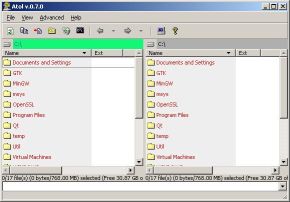
It all actually started with my Windows-only shareware project named "Fileharmonia" some years ago. As a business, it didn't fare too good, so eventually I reused much of this code in the process of creating a portable cross-platform file manager project.
First iteration of this conversion was a dead-end, I've used wxWindows library (now called wxWidgets), which turned out to bring in more problems that it solved (especially when writing multithread code).
Next and current coding iteration is directly based on GTK+ toolkit. I am much more satisfied to use GTK+ directly because this solution is more stable any more easy to work with.
After a few months of hibernation (I've been mostly busy with Notecase) I plan to prepare new Atol release, to show that this project is not dead.
It seems that the main problem with open source project is a motivation. Hacking on Notecase was much more fun lately, mainly because I got much more feedback from people out there.
So, for all users of Atol, don't be shy to contact me if you have any request. This might actually help the project that you use, and might boost my motivation to work on this project.
The other open source project of mine is a file manager named Atol. It is a classical dual-panel manager, trying to emulate TotalCommander.

It all actually started with my Windows-only shareware project named "Fileharmonia" some years ago. As a business, it didn't fare too good, so eventually I reused much of this code in the process of creating a portable cross-platform file manager project.
First iteration of this conversion was a dead-end, I've used wxWindows library (now called wxWidgets), which turned out to bring in more problems that it solved (especially when writing multithread code).
Next and current coding iteration is directly based on GTK+ toolkit. I am much more satisfied to use GTK+ directly because this solution is more stable any more easy to work with.
After a few months of hibernation (I've been mostly busy with Notecase) I plan to prepare new Atol release, to show that this project is not dead.
It seems that the main problem with open source project is a motivation. Hacking on Notecase was much more fun lately, mainly because I got much more feedback from people out there.
So, for all users of Atol, don't be shy to contact me if you have any request. This might actually help the project that you use, and might boost my motivation to work on this project.
Tuesday, November 14, 2006
Project donation
I've been pleasantly surprised few days ago by Daniel Hertrich. He wanted to show his support for the Notecase project and he bought me a DVD title from my Amazon wish list
Thank you Daniel!
Daniel is currently the person who reported a highest number of bug reports, and he made some very cool feature suggestions. The next Notecase release will definitely profit by his great work.
He is also a member of a growing sub-community of Notecase users, the ones that run it on Sharp Zaurus!
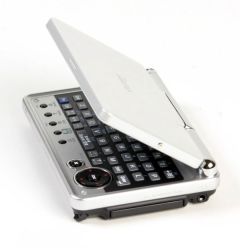 Zaurus SL-C3200 image
Zaurus seems like a really cool machine. It is small, portable, and yet it can run Linux (using pdaXrom or similar X11 based ROM for Sharp Zaurus). I don't own one of these, but I am seriously tempted :)
BTW, Daniel has some great plans for Zaurus. Through his company named Hermocom, he plans to make a full-featured Zaurus/Linux based platform, composed of some chosen open-source programs.
In his words, Notecase is one of the main software components of this project. It will allow the user to record brainstormings and organize ideas. Or, with its HTML export feature, it will allow to record meeting notes and directly, after the meeting, create handouts for the attendants in professional looking HTML format.
You can read more details of this project (named "weeXpc") on his website.
I've been pleasantly surprised few days ago by Daniel Hertrich. He wanted to show his support for the Notecase project and he bought me a DVD title from my Amazon wish list
Thank you Daniel!
Daniel is currently the person who reported a highest number of bug reports, and he made some very cool feature suggestions. The next Notecase release will definitely profit by his great work.
He is also a member of a growing sub-community of Notecase users, the ones that run it on Sharp Zaurus!
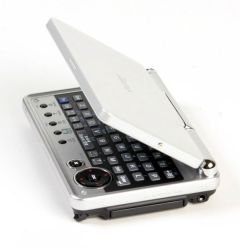 Zaurus SL-C3200 image
Zaurus seems like a really cool machine. It is small, portable, and yet it can run Linux (using pdaXrom or similar X11 based ROM for Sharp Zaurus). I don't own one of these, but I am seriously tempted :)
BTW, Daniel has some great plans for Zaurus. Through his company named Hermocom, he plans to make a full-featured Zaurus/Linux based platform, composed of some chosen open-source programs.
In his words, Notecase is one of the main software components of this project. It will allow the user to record brainstormings and organize ideas. Or, with its HTML export feature, it will allow to record meeting notes and directly, after the meeting, create handouts for the attendants in professional looking HTML format.
You can read more details of this project (named "weeXpc") on his website.
Thursday, November 09, 2006
Notecase bugfixes
It's been a few days after the new release (v1.2.6) and I've got few bug reports from the users. The result is the new pre-release code (and the Windows .exe file) waiting for you at http://notecase.sf.net/temp/
Detailed change log can be found within the source code archive (inside docs/help.ncd file).
BTW, if you are interested in the latest sources, take a look at the address above from time to time.
It's been a few days after the new release (v1.2.6) and I've got few bug reports from the users. The result is the new pre-release code (and the Windows .exe file) waiting for you at http://notecase.sf.net/temp/
Detailed change log can be found within the source code archive (inside docs/help.ncd file).
BTW, if you are interested in the latest sources, take a look at the address above from time to time.
Sunday, October 29, 2006
Notecase news
My personal pet-project named Notecase (http://notecase.sf.net) is an hierarchical notes manager, written using GTK+ and C++.
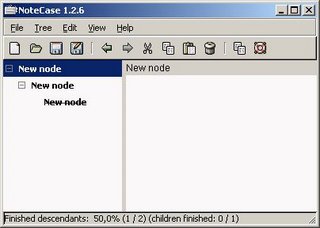
Lately, I've started to receive much more user feedback on it than before, mostly due to the fact that it started being used on Sharp Zaurus platform. Thanks to the feedback I got some quality ideas and bug reports to fix for the new release.
So, expect new release soon with the following news:
My personal pet-project named Notecase (http://notecase.sf.net) is an hierarchical notes manager, written using GTK+ and C++.
Lately, I've started to receive much more user feedback on it than before, mostly due to the fact that it started being used on Sharp Zaurus platform. Thanks to the feedback I got some quality ideas and bug reports to fix for the new release.
So, expect new release soon with the following news:
- default HTML format no longer uses PRE tag to store text formatting. This will enable better CSS formatting when Notecase document is exported to HTML
- some memory leaks fixed
- I've managed to find and fix serious problem with CBlowfish encryption class when compiled in 64-bit environment
- CSHA1 class was updated to new version, solving another problem with x86_64 architecture
- "cut branch" operation was implemented
- Ctrl+T now cycles through the 3 view modes: text view only, tree view only, both views visible
- menu items for tree branch operations were merged with "Copy/Paste/Cut" items from Edit menu
For those who can not wait for the new release you can always fetch latest pre-release code at:http://notecase.sf.net/temp/
Saturday, October 14, 2006
GTK+ file open/save dialog review
Last few years I've been programming with GTK+ toolkit (coming from Win32/MFC world) and I think some remarks gathered over time could help the community to make this toolkit better.
Why not use bugzilla and report the bugs directly, you might say? It's not that I haven't tried, but I have a bad experience with it. Most of my reports for Gnome/GTK still rott there waiting for someone to do something with them :(
One of the things that always bothered me with GTK+ is file open/save dialog.
Starting with GTK 2.6 developers decided to improve on the old dialogs, and created a new GtkFileChooserDialog class, that IMO still needs a lot of work to become usable.
Let's try to see why:
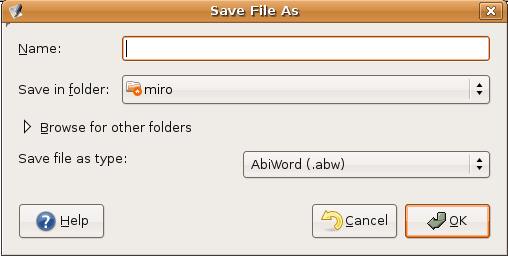
1. In the Save mode, dialog starts in the collapsed state (see "Browse for other folders" in the image below), hiding the file list and optional filter drop down list.
And guess what, you can not controll this behaviour! There is no API to display the dialog expanded from the start!!!
I've managed to make it expanded myself, by writing really really ugly code that can easily become invalid with the next GTK release
(find child #x in the dialog, find child #y within children of #x, ... you got the picture :)

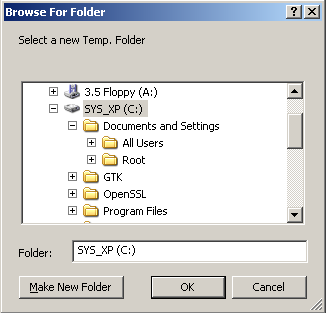
2. Using the dialog in a mode to select only folders, there is no way to use a mouse to select a root directory (or root of a disk drive on Windows) as a destination target!!!
The dialog in this mode of work, allows you to select any other non-root directory, but to select root path, the only workaround I found so far is to use keyboard to type "/" into the folder name. Windows solves this in a much more elegant way, having a special dialog for directory selection.
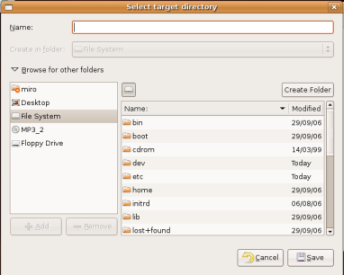

3. The default version of the dialog is not very usable for real-life programs
The best proof of this is that most major programs implement their custom open/save dialogs (packing additional controls below GtkFileChooserWidget). For example see screenshots below for custom implementations in AbiWord and OpenOfice.org packages (I'm sure I could find many more).
I do not claim, that default version must guess all the extra widgets needed, but the basic ones should be covered. The biggest problem is following:
in Windows API, file open dialog uses filter combo box in two ways - to filter the file list and to pick file format for the document to be saved;
GTK dialogs, on the other hand, hides this filter combo by default in the save mode (see problem #1). The result is that the programmer needs to add additional combo (with almost the same content as in filter combo) for user to pick target file format in Save dialog.
So, any programmer whose software uses more than one file format, must use its own custom Save dialog in order to save its users for confusion.


4. IMO, the dialog layouts are somewhat ugly
Conclusion:
GTK+ file open/save dialogs (GtkFileChooserDialog class) could use some polishing in layout to make them more usable and more pretty. The layout shoud be simplified and more intuitive to use.
Last few years I've been programming with GTK+ toolkit (coming from Win32/MFC world) and I think some remarks gathered over time could help the community to make this toolkit better.
Why not use bugzilla and report the bugs directly, you might say? It's not that I haven't tried, but I have a bad experience with it. Most of my reports for Gnome/GTK still rott there waiting for someone to do something with them :(
One of the things that always bothered me with GTK+ is file open/save dialog.
Starting with GTK 2.6 developers decided to improve on the old dialogs, and created a new GtkFileChooserDialog class, that IMO still needs a lot of work to become usable.
Let's try to see why:
1. In the Save mode, dialog starts in the collapsed state (see "Browse for other folders" in the image below), hiding the file list and optional filter drop down list.
And guess what, you can not controll this behaviour! There is no API to display the dialog expanded from the start!!!
I've managed to make it expanded myself, by writing really really ugly code that can easily become invalid with the next GTK release
(find child #x in the dialog, find child #y within children of #x, ... you got the picture :)

2. Using the dialog in a mode to select only folders, there is no way to use a mouse to select a root directory (or root of a disk drive on Windows) as a destination target!!!
The dialog in this mode of work, allows you to select any other non-root directory, but to select root path, the only workaround I found so far is to use keyboard to type "/" into the folder name. Windows solves this in a much more elegant way, having a special dialog for directory selection.

3. The default version of the dialog is not very usable for real-life programs
The best proof of this is that most major programs implement their custom open/save dialogs (packing additional controls below GtkFileChooserWidget). For example see screenshots below for custom implementations in AbiWord and OpenOfice.org packages (I'm sure I could find many more).
I do not claim, that default version must guess all the extra widgets needed, but the basic ones should be covered. The biggest problem is following:
in Windows API, file open dialog uses filter combo box in two ways - to filter the file list and to pick file format for the document to be saved;
GTK dialogs, on the other hand, hides this filter combo by default in the save mode (see problem #1). The result is that the programmer needs to add additional combo (with almost the same content as in filter combo) for user to pick target file format in Save dialog.
So, any programmer whose software uses more than one file format, must use its own custom Save dialog in order to save its users for confusion.



4. IMO, the dialog layouts are somewhat ugly
- most of the screen area is wasted with huge "Add"/"Remove" buttons (making the bookmarks list above them too wide). It would be good to lose those buttons completely and to tranfer those rarely used options in a context menu (currently there exists "Remove", but not "Add" option in a context menu - GTK+ v2.8.20)
- by default, the dialog could be less wide
- the "bookmark" list should have a different background color than main file list,
so that user can intuitively percieve the file list as the main widget - the "bookmark" list is too wide compared to file list, file list should be by far the most dominant widget on a dialog
- I would recommend removing this "expand" widget/state in file save mode (dialog should be always expanded). This is important because it makes the dialog more simple/less complicated to use
- filter combo box should have bigger width and some label left to it (having no descriptive label makes it look strange)
- it would be nice to have few colored icons somewhere, to make this dialog less grey
Conclusion:
GTK+ file open/save dialogs (GtkFileChooserDialog class) could use some polishing in layout to make them more usable and more pretty. The layout shoud be simplified and more intuitive to use.
Subscribe to:
Posts (Atom)